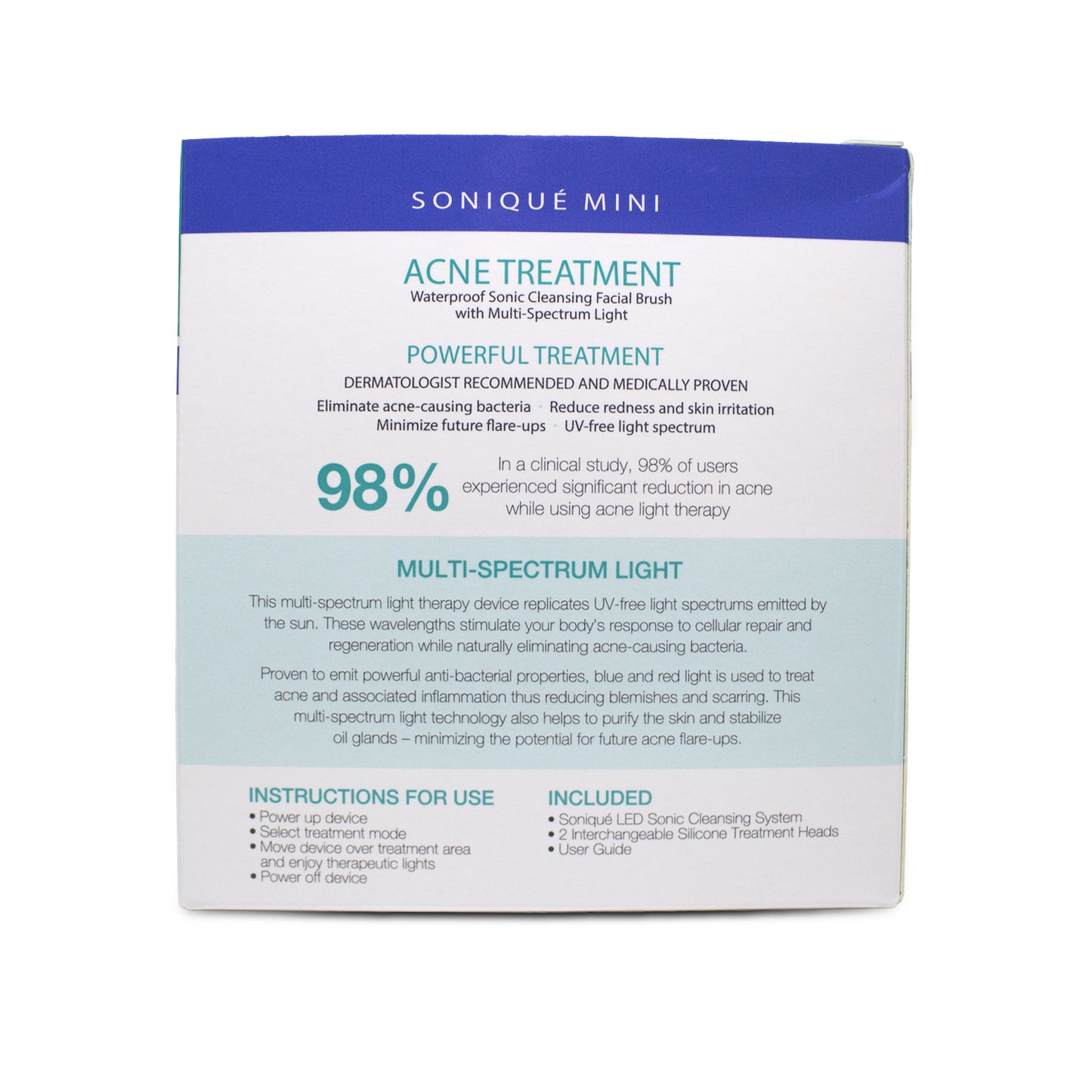
Soniqué Mini LED Sonic Cleanser, Acne Treatment by reVive Light Therapy
SKU: SKU:LED124
This item earns Good Karma Rewards Points.
Note: This item has a special return policy. View Policy >
Couldn't load pickup availability
This item is temporarily out of stock. Please check back soon or click the 'Notify Me' button to receive a notification when this item arrives. We're working hard to get the items you need, and we have deliveries coming in every day.

Details
Your clients can cleanse deep for smoother skin and see results within days with this innovative solution to acne breakouts.
The Soniqué Mini Acne Treatment System combines red and blue light therapy to treat acne. Blue light destroys the acne-causing bacteria beneath the skin’s surface while the red light reduces related inflammation and accelerates healing. The sonic vibrations work to massage the skin and open the pores for a deeper clean. Its waterproof design makes it easy to incorporate into your guests’ daily routines and achieves clear skin with just minutes of use each day.
This system includes:
1 Soniqué Mini Acne Treatment LED Sonic Cleansing System
1 Silicone Cleansing Treatment Head
1 Silicone Massage Treatment Head
1 User Guide
Features & Benefits
- FDA-cleared, OTC Class II medical device
- Medical-grade LED lights reach deep where bacteria live (630nm Red, 415nm non-UV Blue)
- Waterproof
- Treats acne and reduces future flare-ups
- Soothes redness and skin irritation
- Purifies the skin and stabilizes oil glands
- Sonic vibrations massage skin and open pores for deeper clean
- Can be used on other areas of the body—not just the face
- 3 settings: (1) Light treatment only, (2) Lights and gentle sonic vibration, (3) Lights and higher sonic vibration
- Compact size and weight
- Safe for all skin tones
- Operates on 2 AAA batteries (not included)
- 6-month manufacturer's warranty
Usage
Operating Instructions for Sonic Cleansing Mode:
1. Insert 2 AAA batteries.
-
To insert the batteries, remove the silicone brush head. Twist the hard plastic cover to the left so the gray mark lines up with the gray dot. Remove the cover and insert the batteries. Place the light head back on the device, and align the gray mark and the gray dot. Once aligned, push the light head downward and twist to the right (gray arrow will indicate direction) to secure the light head to the cleansing device.
2. If you use makeup, remove makeup by hand.
3. Attach silicone cleansing brush head.
4. Wet your skin and the brush head with warm water.
5. Liberally apply cleanser to your skin or the brush head.
6. Press the power button once to power up the device (lights will turn on).
7. Press a second time for gentle sonic and a third time for higher sonic vibration.
8. Gently move the device over the treatment area in a small circular motion.
9. Press and hold the power button to turn off the device when finished (device will not auto shut-off in Sonic Cleansing Mode).
It is recommended to remove the silicone head after use to allow any moisture between the silicone brush head and the light panel to dry completely.
Operating Instructions for Light Treatment Mode:
1. Insert 2 AAA batteries (see instructions above).
2. Clean and dry the treatment area prior to use.
3. Turn the device on.
4. Place the device directly on the skin over the desired treatment area for 3 minutes.
5. System will shut off after 3 minutes, for light treatment only.
6. Move the device to the next treatment area and repeat steps 3 and 4.
7. Press and hold the power button to turn off the device prior to the 3-minute auto shut-off.
8. Use the device daily for best results.
9. Do not exceed 3 treatments per day, per treatment area.
Troubleshooting
Device not turning on:
Are the batteries fully charged?
Are batteries aligned correctly?
Is the On/Off button turned on?
Device shuts off abruptly, prior to completion of 3-minute treatment:
In Light-only mode, the device is designed to shut off automatically after 3 minutes.
Allow the device to cool down for several minutes, then attempt to turn the device on again.
Some lights appear turned off:
The infrared (IR) light spectrum is invisible to the human eye. These lights will look as if they are not on, but they are operating properly. If the red lights are on, then the device is operating as designed.
- 5 stars: 4 (67%)
- 4 stars: 0 (0%)
- 3 stars: 0 (0%)
- 2 stars: 1 (17%)
- 1 star: 1 (17%)
I sell about 7 a week. Clients as well as myself love this product for its ease of use and effectiveness
This is one of several brushes I've bought from this line. My first two I used in my back bar and they stopped holding charge after about 6 months to a year. The heads also tend to start falling apart after a while and I haven't been able to locate replacement heads. This was the worst one yet. I sold this to a long term client and after about a month it stopped working. She brought it in and we look the batteries out. The battery port was rusted and corroded when she called in for help they said she could not be helped unless the person that sold it to her called in.
I use this in my treatment rooms during the enzyme exfoliation and works great. Easy to clean with removable silicone tops vs. other products I used to use that were not removable. (The other one I used to use, did not last long when they have to be disinfected after each use.) Great and economical! Great to retail too!
The power switch powers up the device with three settings, but it does not power the device off. I have to unscrew the cap every time I want to shut it off. That's a serious design flaw.
Works well, perfectly waterproof, love the results, great price. Love that it gives a client two products to use at one time.
Great retail product. Especially for holidays.
- Choosing a selection results in a full page refresh.
- Opens in a new window.
- Details
Your clients can cleanse deep for smoother skin and see results within days with this innovative solution to acne breakouts.
The Soniqué Mini Acne Treatment System combines red and blue light therapy to treat acne. Blue light destroys the acne-causing bacteria beneath the skin’s surface while the red light reduces related inflammation and accelerates healing. The sonic vibrations work to massage the skin and open the pores for a deeper clean. Its waterproof design makes it easy to incorporate into your guests’ daily routines and achieves clear skin with just minutes of use each day.
This system includes:
1 Soniqué Mini Acne Treatment LED Sonic Cleansing System
1 Silicone Cleansing Treatment Head
1 Silicone Massage Treatment Head
1 User Guide
Features & Benefits
- FDA-cleared, OTC Class II medical device
- Medical-grade LED lights reach deep where bacteria live (630nm Red, 415nm non-UV Blue)
- Waterproof
- Treats acne and reduces future flare-ups
- Soothes redness and skin irritation
- Purifies the skin and stabilizes oil glands
- Sonic vibrations massage skin and open pores for deeper clean
- Can be used on other areas of the body—not just the face
- 3 settings: (1) Light treatment only, (2) Lights and gentle sonic vibration, (3) Lights and higher sonic vibration
- Compact size and weight
- Safe for all skin tones
- Operates on 2 AAA batteries (not included)
- 6-month manufacturer's warranty
Usage
Operating Instructions for Sonic Cleansing Mode:
1. Insert 2 AAA batteries.
-
To insert the batteries, remove the silicone brush head. Twist the hard plastic cover to the left so the gray mark lines up with the gray dot. Remove the cover and insert the batteries. Place the light head back on the device, and align the gray mark and the gray dot. Once aligned, push the light head downward and twist to the right (gray arrow will indicate direction) to secure the light head to the cleansing device.
2. If you use makeup, remove makeup by hand.
3. Attach silicone cleansing brush head.
4. Wet your skin and the brush head with warm water.
5. Liberally apply cleanser to your skin or the brush head.
6. Press the power button once to power up the device (lights will turn on).
7. Press a second time for gentle sonic and a third time for higher sonic vibration.
8. Gently move the device over the treatment area in a small circular motion.
9. Press and hold the power button to turn off the device when finished (device will not auto shut-off in Sonic Cleansing Mode).
It is recommended to remove the silicone head after use to allow any moisture between the silicone brush head and the light panel to dry completely.
Operating Instructions for Light Treatment Mode:
1. Insert 2 AAA batteries (see instructions above).
2. Clean and dry the treatment area prior to use.
3. Turn the device on.
4. Place the device directly on the skin over the desired treatment area for 3 minutes.
5. System will shut off after 3 minutes, for light treatment only.
6. Move the device to the next treatment area and repeat steps 3 and 4.
7. Press and hold the power button to turn off the device prior to the 3-minute auto shut-off.
8. Use the device daily for best results.
9. Do not exceed 3 treatments per day, per treatment area.
Troubleshooting
Device not turning on:
Are the batteries fully charged?
Are batteries aligned correctly?
Is the On/Off button turned on?
Device shuts off abruptly, prior to completion of 3-minute treatment:
In Light-only mode, the device is designed to shut off automatically after 3 minutes.
Allow the device to cool down for several minutes, then attempt to turn the device on again.
Some lights appear turned off:
The infrared (IR) light spectrum is invisible to the human eye. These lights will look as if they are not on, but they are operating properly. If the red lights are on, then the device is operating as designed.